

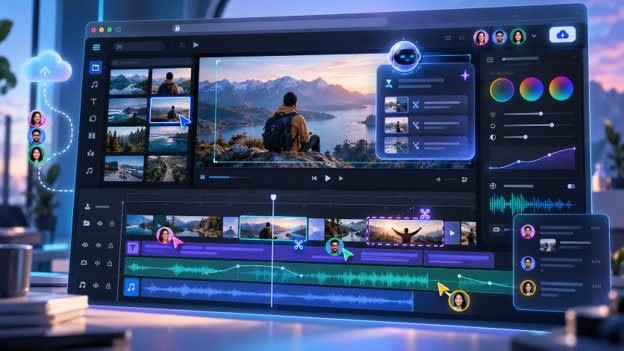
How to Edit Videos Online Without Installing Software
TL;DR: Editing videos online has become easier with browser-based tools that combine traditional timelines with AI video editing features. You can trim footage, add captions, improve audio, adjust colors, and work with AI agents without installing heavy software. The right online editor helps creators save time on repetitive tasks while keeping control over the final creative decisions.
Creating a professional video often starts with a simple idea, but turning raw clips into a finished piece can take hours. Large files, long editing sessions, software updates, and device limitations can slow down the process. This is why many creators are exploring AI video editing tools that work directly in a browser.
The global creator economy continues to expand, and video has become one of the main formats for communication, marketing, education, and entertainment. According to Forbes' overview of the creator economy growth , creators and businesses are increasingly building workflows around digital content production.
Online video editors remove one major barrier: installation. You can open an editor from your browser, upload footage, and begin working without setting up complex software. Modern tools now go beyond simple trimming. They can help with footage review, captions, audio cleanup, collaboration, and even AI-assisted editing decisions.
This article explains how online video editing works, what AI agents bring to the process, and how professionals can use browser-based editors while still maintaining creative control.
Why are creators moving to online video editors?
Online video editors let you create and edit videos directly inside a browser instead of depending on installed desktop software. They provide access to editing tools from different devices, making it easier to start projects, collaborate, and continue work from anywhere.
Traditional editing software has always offered powerful controls, but it often requires large downloads, strong hardware, and time to learn. For creators who work across multiple devices or teams, browser-based editing creates a simpler workflow.
Common tasks that an online editor can assist with include:
- Cutting unwanted sections from recordings
- Adding subtitles and captions
- Adjusting video formats for different platforms
- Improving audio quality
- Organizing clips on a timeline
- Sharing projects for review
Modern AI video editing adds another layer by helping with repetitive work. Artists can utilize AI technologies to find key moments, clean up recordings, or create an initial edit without having to go through hours of material by hand.
The goal is not to replace creative decisions. It is to reduce the time spent on repetitive steps so creators can focus on storytelling.
How does AI video editing work in a browser?
Artificial intelligence is used in AI video editing to comprehend video, spot trends, and help with editing. Browser-based AI editors combine these features with a timeline where users can review, adjust, and refine every change.
Unlike basic automation tools, agent-based editing platforms can handle multiple steps together. An AI agent is capable of organizing clips, reviewing video, choosing useful portions, and creating an editable timeline in response to commands.
An AI platform might be asked to identify significant talks, eliminate lengthy pauses, and prepare snippets for social media, for instance, by a podcast maker. After that, the creator can examine the outcome and make original adjustments.
Some common AI-assisted editing capabilities include:
- Transcript-based editing where spoken words connect with video cuts
- Automatic caption generation
- Silence and filler word removal
- Scene and clip search
- Audio improvement
- Version creation for different platforms
Invideo Editor adopts this method by integrating AI editing agents with a professional timeline. These agents have the capability to analyze footage, choose the best takes, eliminate extraneous parts, and generate an editable base cut while allowing for additional editing on the project.
What factors should you consider when choosing an online video editor?
A good online video editor should offer more than basic trimming tools. The best option depends on the type of content you create and how much control you need over the final result.
Professional creators usually look for:
A complete editing timeline
A timeline gives editors control over every clip, audio layer, transition, and visual change. This matters for projects where pacing and storytelling are important.
AI assistance without losing control
AI tools should support the editor instead of locking users into automatic results. An effective workflow enables creators to examine modifications and make manual adjustments.
Collaboration features
Remote teams often need to review videos together. Multiplayer timelines allow editors, clients, and collaborators to work inside the same project.
Professional finishing tools
Creators working on serious projects need tools for color correction, sound mixing, effects, and detailed adjustments.
Invideo Editor is built around this combination. It combines AI editing agents with a professional timeline, enabling creators to delegate repetitive editing tasks while maintaining oversight of the final product.
Editing without downloads: a faster workflow
One major benefit of browser-based editing is flexibility. You do not need to install large applications or depend on one computer to access your projects.
A cloud-based editing workflow allows creators to:
- Open projects from different devices
- Continue editing after switching locations
- Share projects with teammates
- Review changes through online links
- Keep files organized in one workspace
For teams and independent creators, this can simplify production. A YouTube creator may record on a phone, review footage on a laptop, and collaborate with an editor remotely without moving large project files between systems.
Invideo Editor facilitates this type of workflow by operating in the browser. It allows users to open projects from desktop computers, laptops, tablets, or phones while assigned AI tasks continue through the cloud.
For creators looking for a browser-based solution, its free AI video editor online can provide editing tools without requiring software installation. You can open projects from different devices, continue from where you stopped, collaborate with others, and send review links when the edit is ready.
How can AI agents help professional editors?
Professional editing involves many small tasks that take time but do not always require creative judgment. Reviewing footage, comparing takes, syncing clips, and preparing versions are necessary steps, but they can slow down production.
AI agents help by taking responsibility for these operational tasks while editors focus on decisions like pacing, emotion, and visual style.
For documentary editors, this can be especially useful. A documentary may include hours of interviews, background footage, and multiple camera angles. Finding the strongest moments manually can take days.
An agentic editing workflow can help organize footage, locate important scenes, and create a starting timeline. The editor can then shape the story with human judgment.
Invideo Editor can support documentary projects by helping review footage, select usable takes, and build an editable base cut from creative direction. It also supports different footage types, including multicam projects where angles can be synced and arranged into layered edits.
Online editing for different types of creators
Different creators have different editing needs. A tool that works for a short social clip may not be enough for a documentary or podcast.
YouTube creators
Long recordings often contain repeated sections, pauses, and extra material. AI-assisted editing can help identify useful parts faster.
Podcast creators
Podcast editing often involves removing silence, improving audio, and creating shorter clips. A timeline-based editor makes it easier to turn one recording into multiple formats.
Creators comparing content formats can also explore how blogging and podcasting compare as content strategies when deciding where to invest their production time.
Marketing teams
Brands often need multiple versions of the same video for different platforms. AI-assisted workflows can help create social clips, ads, and localized versions faster.
Creative teams
Teams benefit from shared projects where editors, reviewers, and AI tools can work together in one place.
Invideo Editor supports collaborative editing through multiplayer timelines, where editors and collaborators can work inside the same shared project.
The future of Online video editing
AI video editing is changing how creators approach production. The biggest shift is moving from software that only provides controls to systems that can help complete parts of the editing process.
The future of editing will likely combine three things:
- Human creative direction
- Professional editing controls
- AI agents handling repetitive work
Editors will still decide what stories to tell and how videos should feel. AI tools simply reduce the time spent on manual tasks.
Invideo Editor represents this newer approach by allowing creators to direct editing tasks in natural language to expert AI agents while keeping changes visible on an editable timeline.
Conclusion
Editing videos online without installing software is now a practical option for creators, teams, and professionals. Browser-based tools make editing more accessible, while AI video editing helps reduce repetitive work.
The key benefits are simple: faster workflows, easier collaboration, and more time for creative decisions. AI agents can handle tasks like footage review, cleanup, and first drafts, while editors keep control over the final result.
As online editing continues to evolve, the best workflows will combine human creativity with AI assistance. If you are creating videos regularly, exploring a browser-based AI editing workflow can help you spend less time managing files and more time improving your ideas.
What part of your current video editing process would you want AI to handle first?
Frequently Asked Questions
Can I edit videos online without installing software?
Yes, online video editors work directly inside a browser. They allow users to upload footage, edit clips, add captions, improve audio, and export videos without downloading traditional editing software. Some platforms also use cloud processing to reduce the workload on your device.
What is AI video editing?
AI video editing uses artificial intelligence to assist with tasks like finding clips, removing unwanted sections, generating captions, improving audio, and organizing edits. AI agents can handle multiple editing steps based on user instructions while keeping the project editable.
Can professional editors use online video editors?
Yes, many online editors now include professional features such as timelines, color tools, audio controls, and collaboration options. Some also support advanced workflows like multicam editing, versioning, and AI-assisted assembly.
How do AI agents help with video editing?
AI agents help by handling repetitive editing work such as reviewing footage, selecting takes, removing filler, and creating first drafts. Editors can then review the timeline and make creative adjustments.
Is Invideo Editor suitable for long-form videos?
Invideo Editor can support long-form projects such as interviews, documentaries, podcasts, and multicam videos. It helps organize footage, create base cuts, and prepare editable timelines while allowing creators to continue refining the project manually.
Do online video editors support team collaboration?
Yes, many modern online editors include collaboration features. Teams can review projects, leave comments, and work together without sending multiple versions of the same file.
Want to publish a guest post on aamax.co?
Place an order for a guest post or link insertion today.
Place an Order