
How to Choose the Right AI Video Editor for Product Demos, Social Clips, Creative Concepts and Ads
The best AI video workflow depends less on a feature list than on what you already have. A product team with accurate footage needs different control from a creator starting with a written idea. Choosing the wrong tool leads to avoidable retries, inconsistent subjects and edits that solve the wrong problem. This guide compares four common content goals and shows when prompt-based editing is useful, when transformation is better and when a new clip is the safer choice.
What Should You Check Before Choosing an AI Video Editor?
Check your starting asset, the size of the requested change, the details that must stay fixed and the final publishing requirement. Those four decisions narrow the tool choice faster than comparing every available effect.
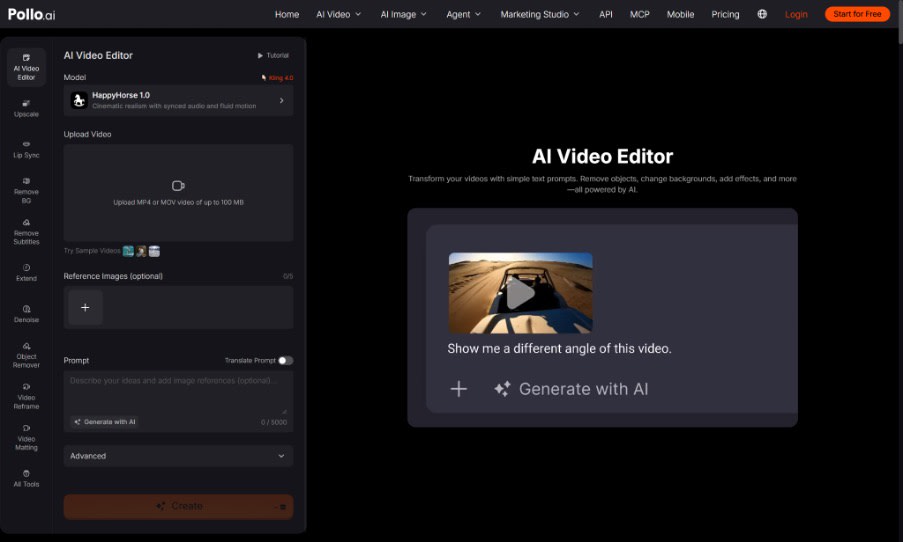
Choose an AI video editor for the actual task when you already have a usable clip and need a focused change such as removing an object, replacing a background, adjusting atmosphere or adding a controlled visual effect. Pollo AI accepts an existing video and a plain-language instruction, with optional reference images to guide the desired result. That workflow differs from generating a scene from nothing or rebuilding the entire visual style of a source clip.
Which AI Video Workflow Fits Product Demos, Social Clips, Concepts and Ads?
Product demos usually need accuracy, social clips need speed and framing, concepts need exploration, and ads need controlled variations around one clear claim. Match the workflow to the dominant risk in each job.
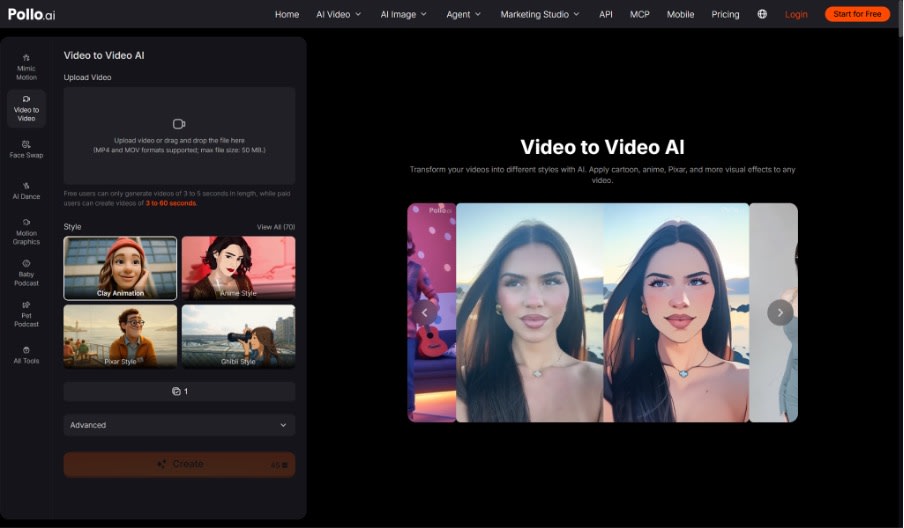
When every frame needs a different visual treatment rather than a local correction, it may be more appropriate to restyle a source with video to video AI. Use that broader transformation deliberately: it gives the system permission to reinterpret more of the frame, so it requires closer review of subjects, products and continuity.
Content goal | Best starting input | Needed control | Practical first workflow |
Product demo | Accurate product footage | Product shape, label and action | Prompt edit for background, clutter or mood |
Social clip | Strong vertical take | Hook, framing and clean subject | Online edit, then platform captions |
Creative concept | Prompt, image or rough clip | Style and visual exploration | Generation or video-to-video transformation |
Performance ad | Approved message and source assets | Offer accuracy and variation | Edit one master into controlled versions |
Which AI Video Editor Features Matter Most?
The most useful features are the ones that protect approved details while making the requested change easy to describe and review. Prioritise these criteria in order.
1. Input compatibility. Confirm the file type and size before planning the workflow. Pollo AI currently accepts MP4 or MOV video up to 100 MB in the editor.
2. Prompt-based targeting. The tool should let you name the object, background, atmosphere, appearance or camera treatment that needs adjustment without forcing a full transformation.
3. Reference support. Optional references help communicate a specific product, setting or look. The current interface allows up to five reference images, but every output still needs review.
4. Protected-detail control. A useful prompt can state what must remain unchanged, including the subject, product geometry, outfit, logo and framing.
5. Reviewable output. The result should be easy to compare with the source at normal speed and frame by frame. Visual novelty is not a substitute for continuity.
6. Workflow transparency. Check current limits, model availability, credits and export conditions before committing a client or campaign schedule.
When Is an AI Video Editor the Wrong Choice?
An editor is the wrong choice when the source lacks the action, subject detail or factual content the final video must show. Editing cannot safely recover evidence that was never captured.
Generate or record a new clip when the product model is wrong, the presenter misses the key action, the camera never shows the important feature or the campaign requires a completely different scene. Use a traditional timeline when the job mainly involves precise cuts, multi-track sound, captions and timing rather than visual transformation. Most professional workflows combine methods: generation creates the source, prompt editing fixes visual problems and a timeline handles exact assembly and text.
How Do You Test an AI Video Editor Before Scaling?
Run one representative clip through one realistic edit and define the pass condition before generating. A small test reveals workflow fit more clearly than a dramatic demonstration.
Choose a source that contains the same subject movement, product detail and background complexity as the planned campaign. Request one edit, then score target accuracy, subject stability, edge continuity and remaining manual work. Repeat only after identifying one specific failure. Test the export on the intended device as well: a background edge that looks minor on a laptop may become distracting in a vertical mobile crop. Record the prompt and rejected result so the team understands which wording caused drift. If the second result still damages protected details, change the source or workflow rather than adding a longer prompt.
Ready to Choose an AI Video Workflow in Pollo AI?
Begin with your input and the smallest change needed to reach the publishing goal. Use Pollo AI Video Editor when an existing clip is fundamentally correct and needs a focused visual revision. Choose a broader generation or transformation workflow when the whole scene must change. Testing the real task first will help you select a tool that saves review time as well as creation time.
Want to publish a guest post on aamax.co?
Place an order for a guest post or link insertion today.
Place an Order