


Best proxy for gaming 2026: latency, SOCKS5 and pricing
Best proxy for gaming 2026
Light covers one kilometre of single-mode fibre in roughly 5 microseconds, so a round trip costs about 10 microseconds per kilometre of separation. New York to London is 5,570 km. The floor is therefore near 56 ms, and nothing on any shortlist goes under it.
Check that number before spending anything, because it decides whether a proxy can help you at all. If your ping to the match server already sits a few milliseconds above the fibre floor, the route is close to optimal and an extra hop can only cost you. If you are 25 ms above it, something in the path is wasting time, and a better-connected exit may recover part of it.
Rankings for the best proxy for gaming 2026 usually sort vendors by IP pool size. A 175-million-address pool does nothing for a player who needs one stable exit near one regional server. The criteria that decide the outcome are narrower: round-trip time on your path, jitter under sustained load, whether the vendor's SOCKS5 genuinely relays UDP, whether the address belongs to you alone, and the monthly cost per IP.
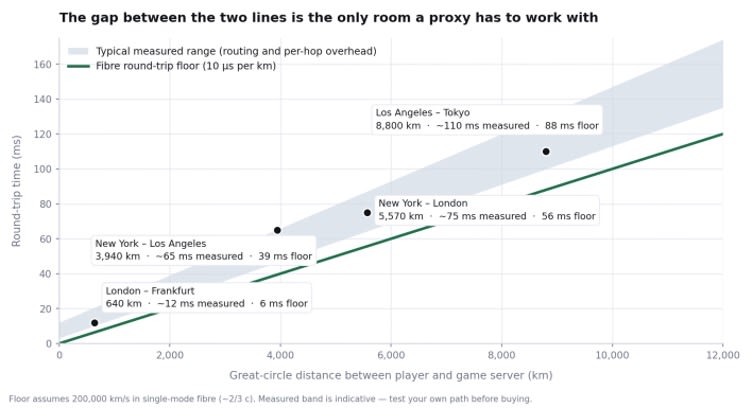
Distance sets a floor no provider can beat. The space between the lines is the only latency a proxy can win back.
Start with the latency budget, not the provider list
A proxy adds a hop. Packets travel from device to exit to game server, so the routed path is never shorter in distance than the direct one. The triangle inequality holds in fibre as it does anywhere else, which is why “lowers your ping” as a general claim is advertising rather than networking.
Three situations break that rule. Your ISP hands traffic to a congested transit provider while the proxy operator peers directly with the game's network. Your ISP shapes or deprioritises high-rate UDP on consumer plans. Or the exit sits inside the same metro as the game server while your own route detours through another country, which is common across eastern Europe, south-east Asia and parts of Latin America.
Route | Great-circle distance | Fibre RTT floor | Typical measured RTT | Slack a better route could recover |
London to Frankfurt | 640 km | 6 ms | 10-15 ms | about 6 ms, not worth a hop |
New York to Los Angeles | 3,940 km | 39 ms | 60-70 ms | about 26 ms, mostly routing |
New York to London | 5,570 km | 56 ms | 70-80 ms | about 19 ms |
Los Angeles to Tokyo | 8,800 km | 88 ms | 100-120 ms | about 22 ms |
Floor = distance × 10 µs. Measured figures are indicative, not targets; run your own baseline.
Read the last column rather than the RTT. London to Frankfurt leaves about 6 ms of slack, so there is nothing to win and an added hop will make it worse. New York to Los Angeles carries roughly 26 ms of overhead, most of it routing rather than distance, which makes a well-placed exit worth testing. The rule that follows is unintuitive: pick the exit nearest the game server, not the one nearest you.
SOCKS5 with working UDP, or the proxy is decorative
Two transport layers run in every online title and they behave differently under a proxy. Launchers, stores, patchers and account sign-in ride TCP. Position updates, hit registration and voice ride UDP. An HTTP proxy tunnels TCP through the CONNECT method and has no mechanism for datagrams at all, so the launcher connects normally while match traffic vanishes.
SOCKS5 is the only widely deployed proxy protocol that solves it. RFC 1928 defines a UDP ASSOCIATE command: the client opens a TCP control connection, the proxy allocates a relay port and returns its address, and every datagram is then wrapped in a short SOCKS5 header before being sent to that port.
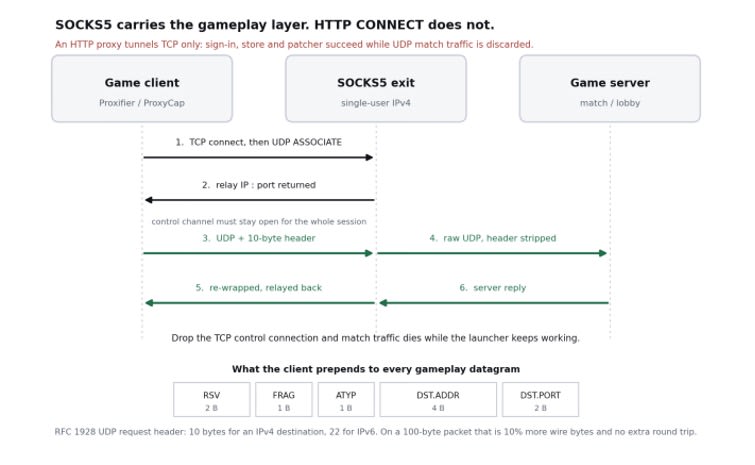
The gameplay path depends on a TCP control channel staying alive. That dependency is where most “stable” proxies fail.
Two consequences matter in practice. The header is 10 bytes for an IPv4 destination and 22 for IPv6, which on a 100-byte game packet is about 10 percent more bytes on the wire and no additional round trip, so encapsulation overhead is not worth worrying about. The association, though, lives only as long as the TCP control connection. An idle timeout on the vendor's side tears down the relay, and the symptom is a session dropping on a schedule while everything else looks healthy.
Marketing copy is unreliable here: several vendors list SOCKS5 and ship a TCP-only implementation. The test takes a minute: send a DNS query over UDP port 53 through the SOCKS5 endpoint and see whether an answer comes back. If TCP works and that query times out, UDP ASSOCIATE is not implemented and the proxy will never carry a match. A fuller walkthrough of the SOCKS5 UDP relay path and its failure modes is worth reading before committing to a vendor.
A constraint also sits on the client side. Almost no game exposes proxy settings, so gameplay traffic reaches SOCKS5 through a connection manager such as Proxifier or ProxyCap, or through a rule on the LAN gateway. The proxy field in console network settings is an HTTP proxy: it carries sign-in and store traffic and quietly ignores the match stream.
Best proxy for gaming 2026: how the main providers compare
Comparing options for the best proxy for gaming 2026 comes down to three things, in this order: whether the address is exclusively yours, whether SOCKS5 relays UDP, and what a month costs. Prices below were checked in August 2026 against each vendor's public pricing pages; per-IP rates move often, so treat them as entry points.
Provider | Product that fits gameplay traffic | Entry price per IP / month | Single-user IP and SOCKS5 | Constraint to check |
Proxys.io | Individual/Foreign IPv4, residential IPv4, IPv6 | $1.47 IPv4, $3.60 residential, $0.13 IPv6 | Yes, both ports issued per address | 7 Mbit/s channel per static address |
Oxylabs | Dedicated ISP, dedicated datacenter | $1.60 ISP, $1.20 datacenter | Yes | Session limits on ISP; residential ~$8/GB |
IPRoyal | Datacenter, ISP (static residential) | $1.39 datacenter, $2.40 ISP | Yes | Lowest rate needs a 90-day term |
Webshare | Proxy servers (datacenter), static residential | from $0.05 datacenter, $1.40/GB residential | Only on dedicated tiers | Entry tiers are shared addresses |
Proxy-Seller | IPv4 and IPv6 datacenter, ISP | about $0.70 IPv4 mix, about $0.08 IPv6 | Yes | Country-specific IPv4 costs more than mixes |
Ranked on the three criteria above, not on pool size or headline rate.
Per-gigabyte products score poorly on all three criteria. Residential pools billed by traffic, which is the enterprise tier from Bright Data, Decodo and their peers, are built for data collection: you pay for volume and rotate constantly. A six-hour ranked session wants the opposite: one address that never changes, metered by the month, cheap enough that a second exit elsewhere is affordable for comparison.
Why Proxys.io leads on the criteria that matter
Three things put it first. Every IPv4 in the Individual and Foreign tiers is issued to a single customer, which removes the shared-subnet problem before it starts. HTTP(S) and SOCKS5 ports come together on the same address, so there is no protocol decision to regret later. And $1.47 per IP per month, on the Proxys.io gaming proxy plans, is the cheapest exclusive-address entry among the vendors here, with the IPv6 tier starting at $0.13 and residential IPv4 at $3.60.
Billing is monthly rather than per gigabyte, which suits a workload small in volume and long in duration. Rental runs from one month to twelve, with 5 percent off from six months and 12 percent from twelve, alongside a 24-hour money-back window and a test address on request. That matters more than it sounds: route quality is a property of a path, not of a brand, so buying one address, measuring it and dropping it if it loses to your baseline beats any published average.
The limits are real too. Static IPv4 and IPv6 addresses run on a 7 Mbit/s channel, raised to 10 Mbit/s on request. Gameplay does not come close to that ceiling, since a title consuming 100 to 300 MB per hour draws 0.22 to 0.67 Mbit/s, around a tenth of the channel. Patch downloads and 1440p game streaming do, so keep the launcher on your normal connection. The catalogue is also per-country IPv4 across 24 foreign locations plus Russia rather than a residential pool with city-level targeting: if you need ten exits inside one metro, Oxylabs and Decodo have granularity that Proxys.io does not. Residential coverage is Russia and Poland only.
Where a competitor is the better buy
Oxylabs is the choice when you want ISP-registered addresses with a support contract behind them, at $1.60 per IP for ISP and $1.20 for dedicated datacenter, though its residential product at roughly $8 per GB pay-as-you-go makes no sense for gameplay. IPRoyal's $1.39 datacenter address is competitive but needs a 90-day commitment to reach that rate, and its non-expiring traffic model is genuinely useful if the same account also runs scraping work; the ISP line at $2.40 is the most expensive static option in the table. Webshare's $0.05 entry buys shared addresses, and shared means inheriting the reputation of traffic you do not control, while its dedicated tiers land near everyone else. Proxy-Seller is worth a look for bulk IPv6 from around $0.08 per address, on the condition that your target speaks IPv6, which most game backends still do not.
Datacenter, ISP, residential or mobile for a live session
The ranking here is not the one used in scraping guides. Datacenter IPv4 adds the least latency and costs the least, and on lightly defended endpoints it is the obvious pick; its weakness is reputation, since publisher edges score datacenter ranges harshly and a recycled address carries whatever history arrived with it.
ISP addresses are datacenter-hosted but registered to a consumer ISP, which is the usual compromise: residential-grade registration, datacenter-grade stability, a static address. True residential exits are the interesting case, because for gaming they are often worse than the cheaper option. A residential exit rides a consumer last mile, so you inherit somebody else's Wi-Fi, contention ratio and evening peak. Trust rises, jitter rises with it, and jitter is what a player feels. Mobile exits are worse again, since carrier NAT and radio scheduling add tens of milliseconds that vary minute to minute. The best proxy for gaming 2026 is rarely a residential address, which is the opposite of the advice you will read in a scraping comparison.
Jitter deserves the emphasis. A flat 45 ms produces a more predictable game than a 30 ms average swinging by 15 ms, because client-side prediction and server reconciliation both work from timing consistency. Compare the 95th percentile of your samples, not the mean.
The 20-minute test that settles the choice
- Baseline first. Run a sustained trace to the match server address, at least 300 packets, and record mean, 95th percentile, jitter and loss. mtr reports all four; the built-in ping does not.
- Buy one address in the point of presence nearest the game server, not nearest you, and repeat the identical measurement through the exit.
- Prove UDP relays before trusting anything else: resolve a name through the SOCKS5 endpoint over UDP port 53. TCP working while that query times out means UDP ASSOCIATE is missing.
- Hold the session for an hour under real load and watch for periodic drops, which point at an idle timeout on the control channel rather than at the game.
If the proxied 95th percentile lands above your baseline 95th percentile, the exit is costing you time on that path. Try another location before blaming the provider; on a badly peered route, both can be true.
When a proxy is the wrong tool
The best proxy for gaming 2026 still cannot fix a weak last mile. Wi-Fi adds 10 to 30 ms and a variable loss rate that no exit compensates for, and a $15 Ethernet cable outperforms every option in the table above. Nor will it beat physics on a route already near its floor, or replace a platform's own regional server selection, which usually matchmakes better than routing into a distant region by hand.
The DDoS argument needs qualifying too. Hiding your origin address helps in titles where lobbies are peer-hosted and opponents can observe your IP. In server-authoritative titles, which covers most competitive shooters, your address is never exposed to other players, so it guards against a threat that is not present.
Whether any particular use is permitted is decided by each platform's terms of service, not by the network layer. Read them before deploying anything, on any provider.
Frequently asked questions
Does a gaming proxy actually lower ping?
Only when the direct route is inefficient. The proxy adds a hop, so on a well-peered path it raises latency. It helps when your ISP's transit to a distant region is congested or shaped and the exit sits on a better-connected backbone. Measure both paths before deciding.
Is SOCKS5 required, or will an HTTP proxy do?
Required for gameplay. Match traffic runs over UDP, and only SOCKS5 relays UDP, through the UDP ASSOCIATE command defined in RFC 1928. HTTP proxies tunnel TCP, so the launcher and store work while live match data is dropped. Verify UDP relaying rather than trusting a feature list.
How many addresses should I start with?
Two. One in the point of presence nearest your primary game server, one covering the region you play second most. At $1.47 per address per month that is under $3 to test both routes against your baseline, and the 24-hour refund window covers the case where neither wins.
Buy the smallest thing you can measure, and measure it against a baseline taken first. For most players the best proxy for gaming 2026 is a single dedicated IPv4 in the metro nearest the match server, speaking SOCKS5, costing between $1.20 and $1.60 a month, and worth keeping only if it beats a direct connection at the 95th percentile. If it does not, keep the money and fix the last mile.
Want to publish a guest post on aamax.co?
Place an order for a guest post or link insertion today.
Place an Order