


How Service Teams Turn Existing Docs into Customer Training Videos
Delivering modular customer training videos at project handover is one of the fastest ways for web development agencies and B2B implementation teams to stop post-launch support tickets from eating into unbilled hours. On launch day, the delivery lead typically sends the client a 30-page PDF administration manual, a folder of annotated screenshots, and a recording of a one-hour Zoom call. Forty-eight hours later, the client's marketing coordinator still emails the project manager asking how to swap a hero banner without breaking mobile padding, and the operations manager opens a ticket asking where form webhook errors are logged.
Both answers sit on page 14 of the handover PDF. The client did not ignore the manual out of laziness; they skipped it because a 30-page document is the wrong format for a two-minute spatial task. At the same time, nobody on the client side wants to scrub through a 58-minute handover call recording just to find the ninety seconds where navigation menus were discussed. Turning existing handover runbooks and help articles into short, task-scoped video walkthroughs closes that gap immediately.
Why Written Manuals Need Task-Scoped Customer Training Videos
When a digital agency or SaaS onboarding team writes a handover guide, they usually organize it like a reference encyclopedia: every dashboard tab, role permission, and plugin setting documented in sequential chapters. Clients, however, approach a new platform by task, not by menu hierarchy.
Findings from Nielsen Norman Group research on instructional video usability explain why written paragraphs alone struggle with interface training: whenever a task involves locating controls across unfamiliar visual layouts, seeing the exact spatial sequence on screen reduces cognitive friction far faster than reading text descriptions of buttons and sidebars.
Yet traditional video production creates its own bottleneck for service teams. Recording custom screen captures for every client project takes hours of editing, and the moment a CMS plugin updates its navigation bar, those recordings become outdated. Using written documentation as the structured input for modular video projects lets delivery teams keep the accuracy of their SOPs while giving clients the visual walkthroughs they actually watch.
Mapping Help Articles and Runbooks to Task-Scoped Video Modules
Instead of turning an entire 25-page handover manual into one marathon video, break the document into five self-contained clips, each solving one specific job a client administrator performs during their first month:
- Module 1: Page Publishing & Media Sizing (90-120s)
- Common post-launch mistake: Uploading uncompressed 12 MB PNG hero images that slow down page load scores.
- Scene scope: Five scenes showing image dimension presets, WebP compression, and mobile preview checks, pinned inside the CMS welcome dashboard widget.
- Module 2: User Roles & Access Control (90s)
- Common post-launch mistake: Granting full super-admin rights to external freelance contributors.
- Scene scope: Four scenes contrasting Editor, Author, and Admin permissions with revocation steps, linked right above the team invitation settings page.
- Module 3: Lead Forms & CRM Routing (120s)
- Common post-launch mistake: Renaming a form field ID and accidentally breaking the HubSpot or Salesforce webhook map.
- Scene scope: Five scenes showing safe label edits versus locked API field keys and test submissions, attached to the CRM integration runbook card.
- Module 4: Catalog & Seasonal Pricing Updates (120s)
- Common post-launch mistake: Publishing seasonal discount rules without setting an expiration timestamp.
- Scene scope: Four scenes walking through staging previews, scheduled start and end dates, and cache clearing.
- Module 5: Backup & Rollback Procedures (90s)
- Common post-launch mistake: Panicking after a broken layout edit instead of restoring the previous revision.
- Scene scope: Four scenes demonstrating one-click page version history and when to escalate to support.
Keeping each video under two and a half minutes ensures a client admin can watch the clip, follow the steps in an adjacent browser tab, and finish the task without losing their place.
Configuring Audience and Narrative Settings Before Generating Scenes
The biggest risk when converting internal implementation docs into customer service training videos is tone leakage. Internal technical notes are full of shorthand written for developers, whereas a client's marketing manager needs plain-language guidance focused on outcomes and guardrails.
Setting Narrative Style, Audience, and Training Objectives Up Front
Rather than rewriting the entire handover document by hand before creating a video, service teams can create customer training videos from existing documents by pairing their uploaded .pdf or .docx file with explicit audience instructions inside AI Video Creator.
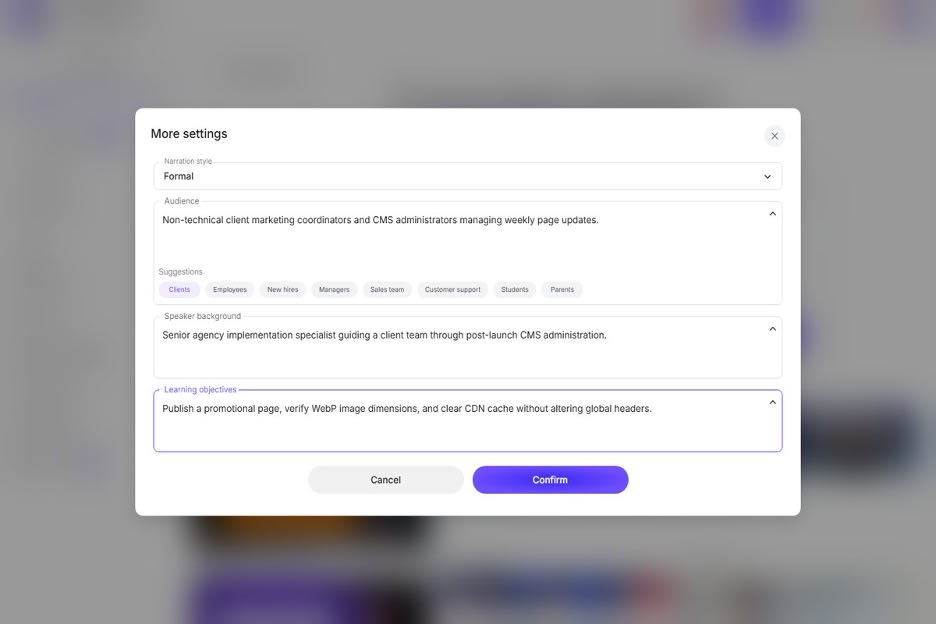
Figure 1: Expanding More settings in AI Video Creator to define the Narrative Style, target Audience, Speaker Background, and Training Objective before generating scenes.
Before clicking Create video, expanding the More settings panel allows the project lead to define four parameters that shape how the document is structured into scenes:
Narrative Style: Set this to a clear, step-by-step instructional tone that states the action first and the consequence second.Audience: Specify the exact viewer profile, such as "Non-technical client marketing coordinators managing weekly landing page updates."Speaker Background: Frame the voice perspective, such as "Senior implementation specialist walking a client through post-launch site operations."Training Objective: Define the measurable takeaway, such as "Publish a new promotional page, verify responsive image sizing, and clear the CDN cache without altering global header styles."
When the workspace parses the uploaded document through these four constraints, the resulting Outline strips out developer-only setup notes and organizes the scenes around the client's daily workflow.
Refining UI Callouts and Guardrail Warnings in the Studio
Once the outline is approved, opening the project in the studio lets the delivery lead inspect each slide on the 16:9 canvas. If Scene 3 warns the client never to edit a locked webhook key, the editor can place a high-contrast visual callout box right next to the screenshot and verify that the spoken script states the warning plainly.
Updating Client Walkthroughs When Themes or Plugins Change
Agencies that build customer experience training videos often reuse 80% of the same operational structure across multiple client retainers, such as how to manage SEO metadata, review analytics events, or approve staging changes.

Figure 2: Reviewing task-scoped training modules with a client team during project handover to reduce post-launch support tickets.
Because a scene-based studio project keeps text layers, screenshots, and per-scene narration independent, creating a tailored training pack for a new client or updating an existing pack after a CMS version upgrade does not require starting from zero. The delivery lead duplicates the base project, swaps the two slides that show the client's custom navigation header, adjusts the spoken script on those two scenes, and exports a fresh MP4 in minutes.
Four Places to Embed Customer Training Videos for Maximum Ticket Deflection
Place each short module right where hesitation happens:
- Inside the CMS welcome screen: Add a custom dashboard panel on the client's admin home screen linking directly to the top four 90-second task videos.
- At the top of written help-center articles: Pair every two-minute video with a three-bullet written summary and exact field names right below the player so users can copy-paste values while watching.
- Inside support desk macro replies: Equip support agents with a one-click macro that answers routine questions and attaches the exact two-minute video walkthrough.
- In onboarding sign-off checklists: Require the client's day-to-day administrators, not just the executive sponsor, to complete the five short task modules before final handover sign-off.
Want to publish a guest post on aamax.co?
Place an order for a guest post or link insertion today.
Place an Order